Today, we’re introducing Agent Skills in Omni, where repeatable data workflows become governed agents on your semantic layer.
An agent running on your data needs to know how tables relate. Table A joins to Table B on a primary key. Revenue is calculated this way, not that way. User X can see these rows, but not those.
The agent can figure this out on the fly. It can read schemas, infer relationships, and guess at definitions. But it has to do this every time it runs, for every query and workflow. It re-derives the same structure that your data team already defined.
This is a waste of resources. Yours and the agent's.
The data ecosystem solved this problem #
Defining relationships between entities once and reusing them everywhere isn’t new. In knowledge systems, it is called an ontology. In the data ecosystem, it is called a semantic layer.
A semantic layer defines how tables join, how metrics are calculated, and who can see what. These definitions exist once. Every query uses them. The agent does not re-derive. It uses what is already there.
The semantic layer also constrains the agent in useful ways. It is not just about correctness. It is about access. When a finance manager runs an agent to analyze company-wide software spend, the semantic layer ensures they see what their role allows. The same agent, triggered by a different user, returns different results based on the same governed definitions. The constraint is the feature.
Packaging repeatable work #
When the semantic layer provides that foundation, something new becomes possible. You can take a repeatable data workflow and package it as a utility. Define the instructions in one place. Let people adopt and improve them through a single artifact. The semantic layer guarantees the data underneath is reliable, consistent, and auditable.
Those packaged utilities are called Skills.
A skill is a set of instructions that tells the agent what process to follow. The semantic layer tells the agent what the data means. The skill controls the workflow. The semantic layer controls the data. Each handles what it is good at.
The combination is what matters. Skills on raw data give you consistent instructions with unreliable data interpretation. Skills on a semantic layer give you consistent instructions with governed data. The output is trustworthy because both layers are controlled.
What this looks like in practice #
James, a Product Expert at Omni, started with a familiar problem. The same type of question every day. The same detailed prompt typed from scratch every time.
The first version of the skill was four lines (see his demo here).
One prompt replaced a manual search across multiple sources. So the skill grew.
Each iteration got more specific. Sample queries were embedded in the instructions to control the shape of query results, ensuring specific fields, filters, and URLs were always included.
The sample query guarantees the right fields and structure. The Topic, a curated dataset, enforces which data the agent can access and how it joins. The skill description controls the search strategy and output format.
As MCP servers were added for Slack, Google Drive, and docs search, the steps became tool calls. The skill evolved from a query shortcut into a multi-source agent with governed data underneath.
Take action #
The output of a skill is not limited to a chat response. Skills produce artifacts that route work to other systems. Here are a few simple examples of how we use this internally:
Bug intake #
Takes a Slack link and bug description. Searches GitHub and support tickets for known issues. If the issue already exists, the skill stops and points to the existing thread. If the behavior is novel, it qualifies the bug, drafts a GitHub issue using a canonical template, and outputs a prefilled link. The user clicks and submits.
Docs coverage #
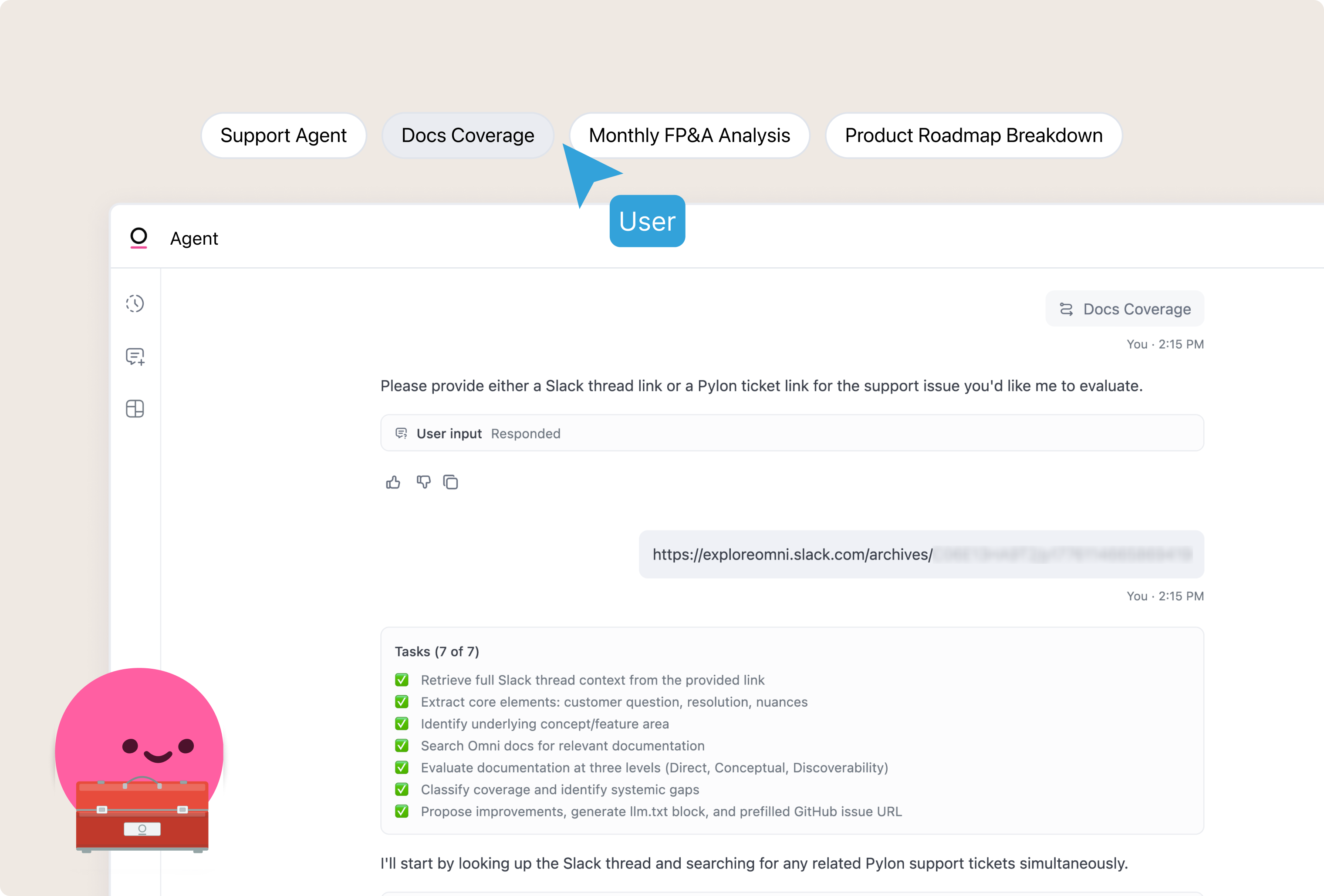
Takes a Slack thread as input. Searches documentation for coverage gaps. Outputs a formatted guide and a prefilled GitHub issue link for filing the change.
Period-over-period general ledger variance analysis #
Takes two months and compares Total Amount by account across the full P&L. Flags any account with ≥20% and ≥$50,000 change, then investigates every flag. Then breaks down by department, scanning journal entries for accruals and reversals, and checking a 3-month trend to classify the root cause. Ends with an executive summary ready for finance leadership.
Product roadmap questions #
Answer a product question from a field team member. Searches Slack, the engineering roadmap, GitHub Issues, and Engineering Demos for relevant information. Synthesizes findings into a structured answer with source links and a confidence level, then recommends next steps or flags when to follow up in our product Slack channel.
These skills combine governed data retrieval through Omni actions across systems like AWS, GitHub, and Slack. The skill automates retrieval, formatting, and routing to external platforms.
How skills work #
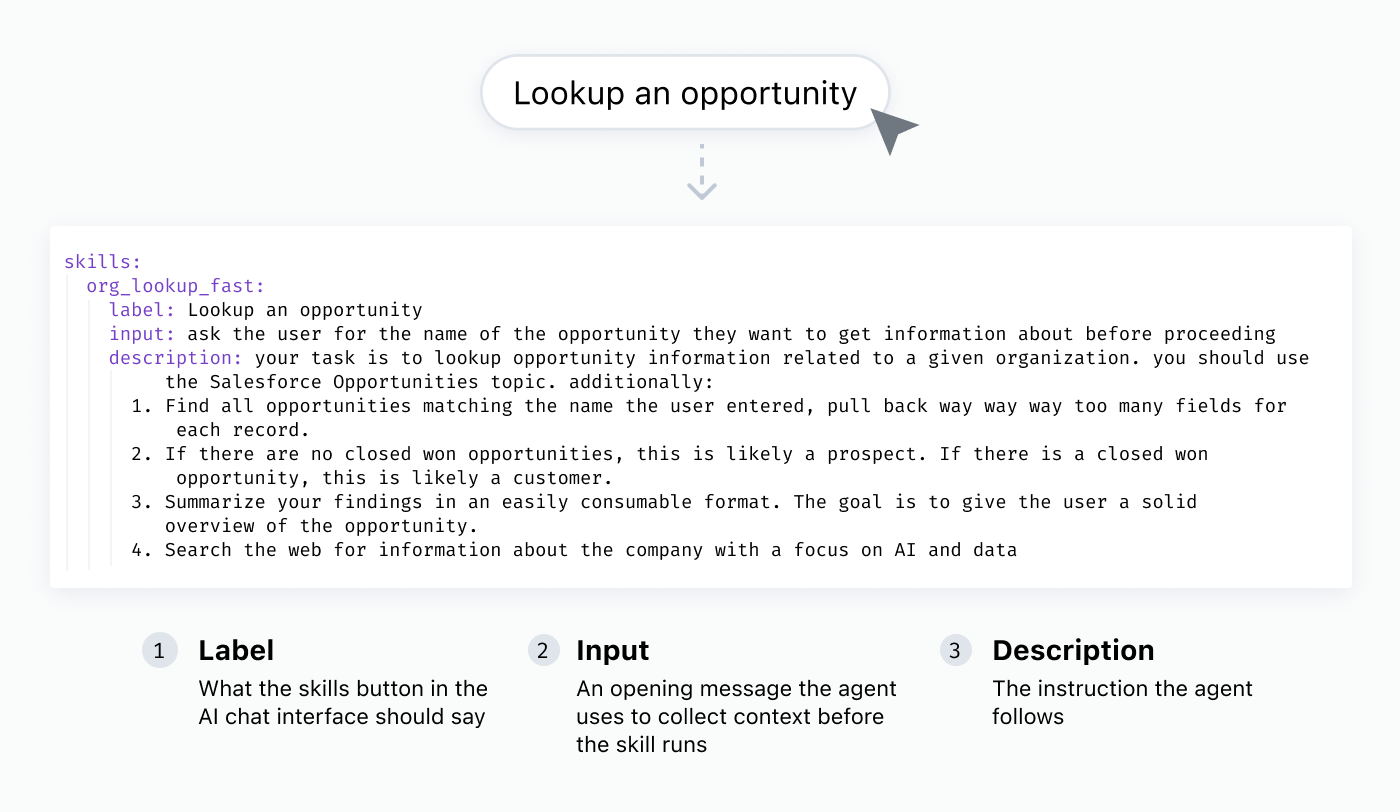
A skill in Omni is defined in the semantic model with three properties:
label: button text in the AI chat interface.
input (optional): an opening message that collects context before the skill runs. An account name, a Slack link, an error ID.
description: the instructions the agent follows. A single sentence for a simple report. A multi-page agent prompt with numbered steps, hard gates, and decision logic for a complex process.
When a user clicks a skill button in Omni, the agent responds to the input, collects what it needs, then follows the description. Queries route through topics. Permissions and metric definitions apply automatically. The user can refine or follow up in the same conversation.
Skills are version-controlled and branch-safe. Authors iterate on a skill in a branch, test it, and promote it when it works.
Where this goes #
The next step is combining skills with scheduled and event-driven automations. When that happens, skills become proactive. Agents running on your behalf inside your company's software plane. Doing the work on a schedule or in response to an event.
Skills on a semantic layer are the optimal package for turning repeatable data workflows into agents.
Get started #
Think about the prompt you write most often. That’s your first skill.
Start with a few lines. Run it. See what the agent does well and where it drifts. Add specifics where results are inconsistent. Embed sample queries to control the output shape. Remove instructions the agent handles on its own. Refine through use.
Read the AI skills guide for examples and best practices. See the skills YAML reference for the full parameter list.