Throughout my career in data, I’ve spent many hours debugging the differences between what my BI tool tells me and what the source data tells me. Salesforce opportunity count. Zendesk resolution times. GitHub issues. I always end up deep in docs, staring at lines of code, trying to find the needle in the SQL haystack.
So when I started building out our Google Analytics data model here at Omni, I was curious if AI could improve this process. Unsurprisingly, it could!
By plugging AI agents directly into our infrastructure, I gave them the ability to explore database schemas, read documentation, run tests, and verify results against live APIs — turning what is usually a manual, error-prone verification process into a single command. For the examples in this blog, I used Codex from OpenAI to connect to MCP servers from Omni, BigQuery, Context7, and Google Analytics.
First, I’ll share some thoughts on why this problem has historically been so hard to solve. To see a detailed example of AI modeling our GA4 data, skip here →
Why this matters #
The built-in analytics offered by many tools is often a helpful starting point for understanding data. But to really dig into the metrics, connect them to other business areas, or interact with them in a more flexible way, you need to extract the data and put it into a tool designed for analyzing data.
The problem is that the moment you do this, you inherit a much harder responsibility: matching the source system’s numbers exactly.
Most production data systems already have a canonical way people understand the numbers, such as a dashboard, report, or API they trust and reference daily. But, the moment you extract that data and introduce a new data model, you’re implicitly competing with that source of truth. If your model doesn’t reconcile exactly with what users already see — down to timezones, defaults, filters, and edge-case logic — you don’t get “close enough.” In these cases, even the slightest mismatch can result in zero trust.
This is where most data projects stall. You can build a model quickly, but you still have to convince everyone it matches what the source system would report — and creating that proof is usually a manual process. This is what makes verification such a tedious but important part of data modeling.
So it got me thinking: if LLMs can write code, can they then prove their logic matches the specific timezones, samplings, and filtering rules of the source system to speed up verification?
When you do these tasks manually, you lose hours or days. But when you leverage agentic modeling, the same work takes seconds — leaving time for more strategic work.
Task | Manual Data Modeling | Agentic Data Modeling |
|---|---|---|
Documentation | Endless doc searching | Instant documentation lookup |
Model Creation | Custom SQL & unnesting | AI-generated YAML files |
Policy Testing | CSV exports & spreadsheets | Automated API comparison |
This is where Omni’s AI assistant, Blobby, comes in. We’ve been expanding Blobby’s abilities across the app to cover everything from complex reasoning to completing modeling tasks directly in the Omni UI. But beyond what’s possible natively, we love seeing and learning from how developers are pushing the boundaries using open protocols like MCP. And this inspired me to try something new myself.
For an example, let’s walk through how I built a semi-autonomous workflow to model complex GA4 data, validate it against the source, and publish it to Omni.
Modeling Google Analytics data manually vs. with AI #
If you've ever modeled Google Analytics 4 (GA4) data manually, you know the pain: unnesting event_params, handling timezone boundaries, and worst of all: verifying that your exported data matches GA4’s analytics.
Proving your SQL matches the official Google Analytics UI could take hours. You usually have to:
Open the GA4 report in one window.
Recreate the logic in your data model in another.
Export both to CSV.
Spend hours staring at mismatched row counts, only to realize you forgot a timezone conversion.
With some help from AI agents and MCP servers, I was able to make this entire loop fully automatic and complete it in seconds. The agent:
Writes the Omni models
Queries the GA4 & BigQuery APIs
Compares the results
Keeps working until the results match
It’s not only faster, it actually makes modeling fun again.
Building the agentic modeling architecture: A three-layer "Team" #
We organized our system as a set of MCP-powered layers with each playing a distinct role in the modeling and verification process. Together, they mirror how a human data team works, except the handoffs are automatic and the feedback loop is immediate.
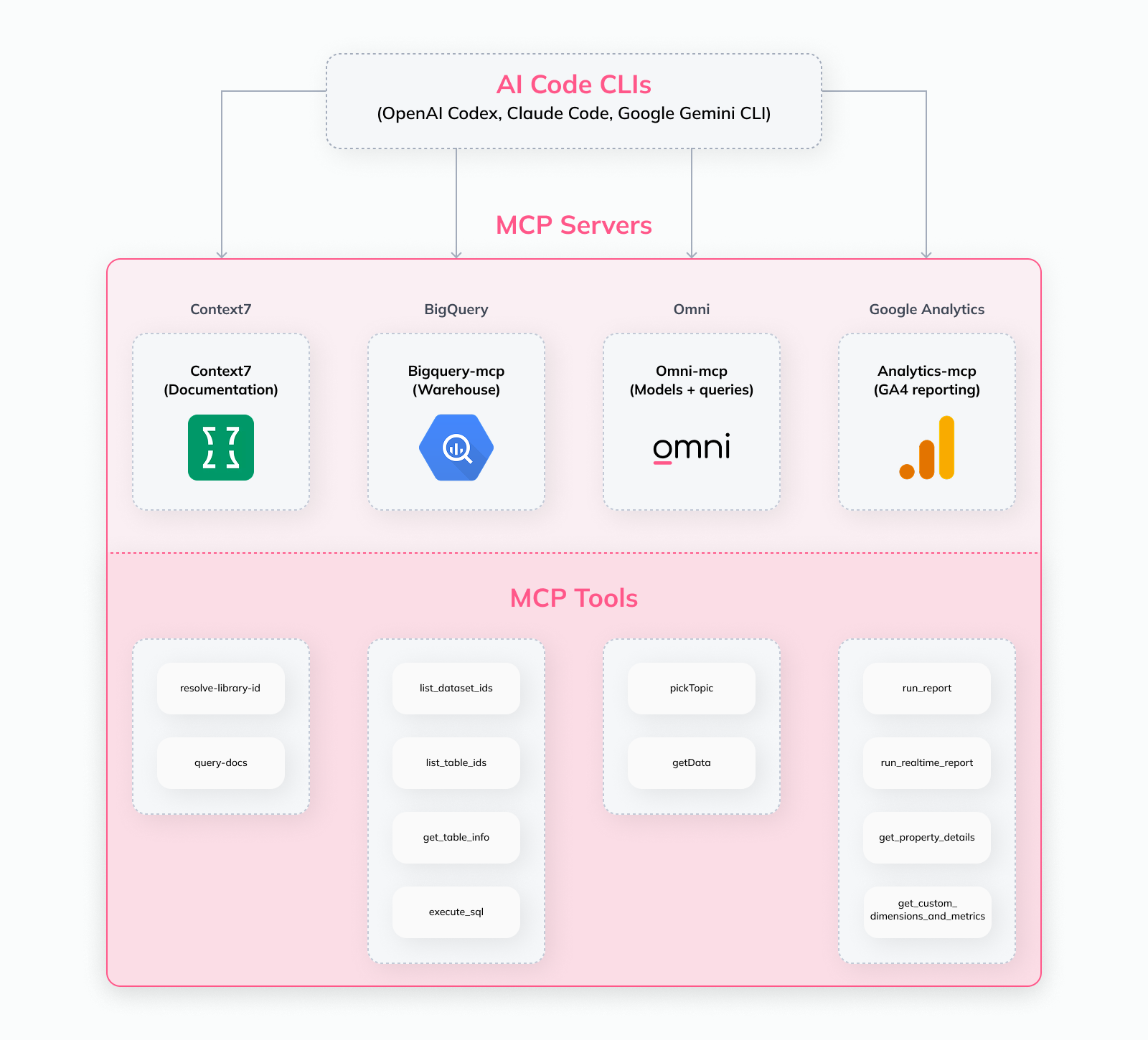
1. Reference layer (Context)
The Reference layer gives the agent access to authoritative context on the data schemas, field definitions, model syntax, and more.
Using a Documentation MCP (via Context7), the agent can read:
Instead of guessing column names or parameters, the agent looks them up. This significantly reduces hallucinations and avoids invalid models before they’re written. And it’s way faster than a human (i.e., me) sifting through dozens of docs pages.
2. Development layer (Modeling)
The Development layer is where modeling happens.
Through the BigQuery MCP, the agent can:
Inspect datasets & tables that actually exist
Understand partitioning, intraday tables, & schema variations
Generate SQL to normalize nested structures like event_params & user_properties
This layer ensures the agent is working against the real warehouse environment, not an abstract or assumed schema.
Omni can then access this modeled data in BigQuery, so the Omni MCP server can use it to generate queries.
3. Verification layer
The Verification layer is the final gate, ensuring that the newly modeled data produces the same outputs as the original GA4 data.
Instead of validating raw SQL outputs directly, the agent verifies modeled results through Omni, using the same modeling and query layer that end users rely on. By using:
Omni MCP to query modeled results
Google Analytics MCP to fetch official GA4 reporting outputs
The agent compares:
Metrics & dimensions as exposed by Omni
Against GA4’s canonical reporting API for the same definitions & date ranges
Any discrepancy — caused by timezones, defaults, filters, or modeling assumptions — is surfaced immediately. Models only move forward once Omni’s results match the source of truth.
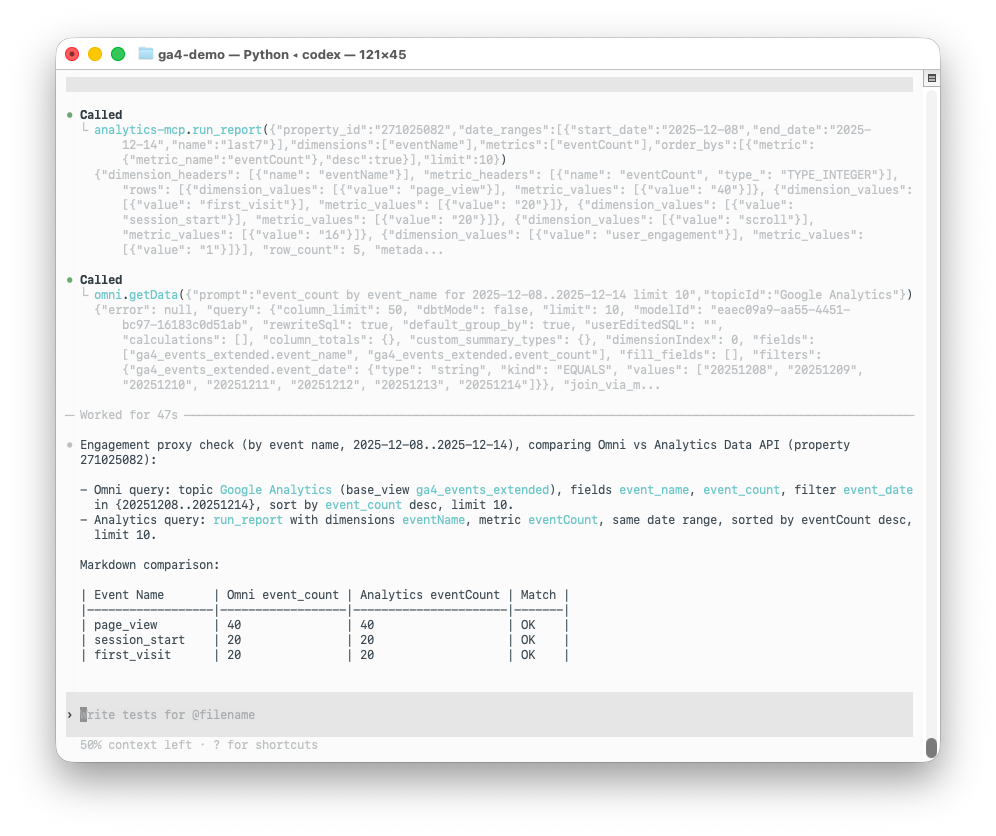
Together, these three layers create a closed-loop system that understands the context and rules of each system, builds against real data, and verifies through the same interface users will ultimately see.
How to make the agent successful #
Tool access is only half the story. The reason this workflow works is that the agent operates under a strict “operating contract” that prevents wandering, enforces verification, and keeps every output grounded in real data and documented rules.
We captured that contract in an AGENTS.md file: a lightweight set of instructions that defines what the agent is allowed to do, what tools it must use, and what “done” actually means.
At a high level, the agent follows four rules:
Ground everything in reality: Never assume fields, table names, or syntax. Use BigQuery MCP to inspect schemas and Context7 to reference official docs.
Model in Omni’s syntax: Generate Views and Topics as YAML using Omni’s documented patterns (and the extends pattern for safe refinement).
Treat parity as the acceptance test: A model is only “complete” when Omni’s outputs match the source system’s canonical reporting API.
Iterate until it matches: If results differ, the agent diagnoses why (timezone, defaults, sampling, filters) and revises the model until parity is achieved.
Here’s a condensed excerpt of the flow we give the agent:
The "extends" pattern
One specific technique we use to keep things clean is Omni's extends, or hub-and-spoke, functionality, which allows you to create templated models that can then be shared and customized across your instance.
We ask the Agent to generate a base view based on the database schema. Then, we instruct the agent to create a separate, business-friendly "Extended View,” instead of editing that generated file (and losing changes if we regenerate it):
ga4_events.view.yaml(Auto generated by Omni: raw columns, types)ga4_events_extended.view.yaml(Human/AI refinement: nicely labeled measures, descriptions, specific business logic)
This has the AI do the heavy lifting of mapping 50+ columns first, then surgically refining the business logic in a safe, separate layer.
Agents let you prototype before production
While this changes a lot, it doesn't change everything. The most complex, long-lived transformations still belong in tools like dbt. That’s where teams enforce version control, testing, and production-grade data contracts inside the warehouse.
But, this agentic workflow speeds up all the steps before to help get you to that point.
By using Omni as the modeling surface, agents can rapidly explore schemas, prototype logic, and critically verify parity against the source system while the context is still fresh. Once the logic is correct and trusted, Omni’s Convert to dbt functionality lets you move those models directly into your data warehouse as dbt projects.
In practice, this creates a clean handoff:
Omni + agents for fast iteration, validation, and trust-building
dbt for durable, production-grade transformations in the DWH
Instead of treating prototyping and production as separate worlds, agentic modeling squashes the distance between them.
Seeing it in action
Rather than walking through every step line by line, it’s easier to see this workflow end-to-end.
In the short demo below, I show you how the agent:
Inspects GA4 schemas to understand what data is available
References official docs to learn how the data should be modeled
Generates Omni models as files
Verifies parity through Omni against GA4’s reporting API
All without manual back-and-forth or spreadsheet comparisons.
The loop is the critical innovation here. The agent can discover, model, and verify in one continuous flow, using the same interface users ultimately trust.
Note on model creation: In this demo, the agent generates Omni models as YAML files, which are then reviewed and added to the project manually. This keeps the modeling and verification loop easy to inspect while exploring the agentic workflow.
For teams that want to fully automate this step, the same YAML models can be created or updated programmatically using Omni YAML sync.
Saving time and increasing trust with agentic data modeling #
We are moving from "AI as a chatbot" to "AI as a coworker." By giving the AI access to tools — BigQuery for schema, Context7 for docs, Omni for modeled queries, and GA4 for verification — we create a loop where the AI tests, validates, and guarantees the quality of its own work.
While Omni is rolling out native AI features to help analysts in the flow of work, plugging in external MCP tools allows analytics engineers to handle heavy-lifting tasks — like migrating complex schemas or auditing historic data parity — with a level of speed and confidence that manual modeling simply can't match.
If you’re dealing with complex models and constant parity checks, try building a small MCP “team” and see what it unlocks for you!