Most teams that move off of Looker aren't in crisis. They've just slowly pushed up against a painful ceiling. The model is rigid, the platform is falling behind, and product support no longer matches the price tag.
Even once you've decided to migrate, charting the course can feel daunting. Good news: the journey is shorter than it looks.
The great news is, it’s much easier than it used to be. We've built tools, services, and processes to make BI migrations faster and more straightforward. In this guide, we’ll cover how to think about your migration, what to do before you start, and which paths you can take to get there.
While many of the processes and tips are relevant regardless of which legacy BI tool you’re currently on, we’ve included specific tips for migrating from Looker. In future guides, we’ll share specific resources for other tools, such as MicroStrategy, Tableau, and Power BI.
Why teams move off of Looker #
Three things accelerated the timeline for most Looker migrations:
The AI gap
Looker's AI depends on Explores, LookML, and Gemini. It's technical to configure, rigid to customize, and hard to trust at scale.
Omni's semantic layer was designed for AI. Teams add AI context, synonyms, and sample queries directly in the UI. The system learns from how people use it and gets better over time, and admins can easily manage AI at scale from the AI Hub. That matters because AI is finally improving self-service, but Looker wasn’t built for AI.
Cribl migrated a governed Looker-era estate in three months and had 23% of users on Omni's AI immediately after rollout, with no dedicated training.
Omni's AI isn't a black box. We're able to learn from our own usage and take action. We still have control, and that's crucial to ensure AI is trustworthy for users across our organization.
Head of Data, Cribl
A slowing roadmap
Product development at Looker has slowed down since the Google acquisition.
Teams making multi-year BI commitments want a vendor that ships, stays close to open standards, and incorporates customer feedback. At Omni, we release new features weekly. You can follow along at omni.co/demos.
Less partnership
Looker’s customer support model changed after being acquired by Google, leaving many customers waiting on tickets for help with no direct line to the Looker team.
It’s not just about software; you deserve data experts to help you through the migration and beyond. This is why we connect directly to every customer with a dedicated chat channel (Slack, Teams, etc.) That's not a small thing when you're in the middle of a migration, or in the future when you have a question or need someone to bounce ideas off of.
What teams find on the other side #
The teams that make the move find something they weren't fully expecting: a platform users can jump into on day one and context that compounds as you build one semantic layer that handles internal BI, embedded analytics, and AI without duplicating logic or maintaining a separate system. Self-service that sticks because users can start in point-and-click, pivot to spreadsheet formulas, or ask in plain language without hitting a wall.
BuzzFeed migrated its eight-year-old Looker estate and launched company-wide in less than three months.
Using Omni has reduced the number of new questions and consolidated the reports our Analytics team needs to build. It's given us time back while giving our stakeholders more independence to explore what they need.
Senior Director of Analytics, BuzzFeed
Brevo consolidated five BI tools (including Looker for embedded analytics) into Omni, reducing their data team backlog by weeks' worth of questions.
People were getting different numbers across tools, and the backlog of data requests kept growing. We needed one platform where everyone could answer their own questions.
Lead Analytics Engineer, Brevo
Treat the migration as a design opportunity #
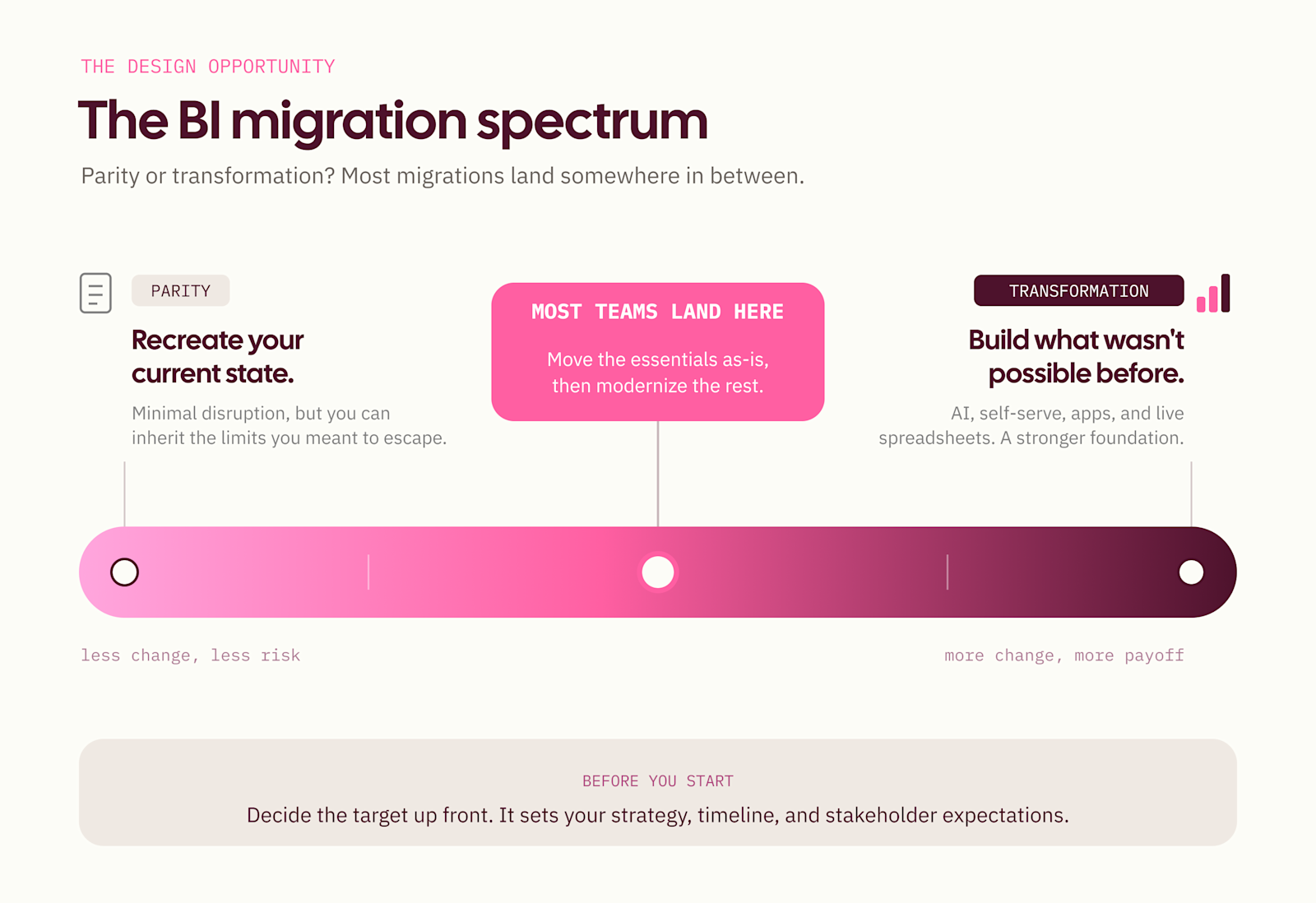
Here is one of the most important questions of all: are you aiming for parity, or transformation?
Parity is recreating your current state. While it seeks to minimize disruption, the tradeoff may be inheriting bloat you want to escape.
Transformation is often migrating less to achieve more. After moving business-critical elements, show your users new ways of accessing or analyzing data that weren’t previously possible: self-serve exploration, AI chat, apps, and live spreadsheets. Any of these could be an exciting paradigm shift, leading to novel questions, efficiency, or new opportunities.
Most teams land somewhere in the middle. What matters is that you've talked about it before you start. The answer sets your strategy, your timeline, your stakeholder expectations, and how you prioritize content.
Before you start #
There are four things to nail down before setting off on your migration:
1. Get stakeholder alignment
Who are the decision-makers? Which teams depend on Looker most heavily? Find the power users and get their buy-in early on. The teams that invest in this upfront move faster and with less friction.
Getting business input into the process early is one of the most effective things you can do. Guitar Center included 50 people across the organization in their trial process before making their BI decision. They ran a user survey to give the business a voice in the outcome and used the results to build company-wide support for the transition. The migration that followed had organizational buy-in before a single dashboard was rebuilt.
"I ran our own survey to capture user feedback because I wanted the business to understand why we were making a certain choice. 77% of surveyed users preferred Omni over Tableau, and 91% rated it a good tool. We stacked the deck with Tableau users, and still got overwhelming support for Omni." Mike Doll, VP of Data at Guitar Center
Migrations that invest in alignment early are the ones that ship clean and stay clean.
It’s always a good idea to over-communicate throughout the migration (why you’re moving and where things are now). Omni Services will be there to help organize and spread the good news, train users, and help everyone understand all the new things they can do. But the old truism, "say it seven times," has never failed.
2. Identify dependencies and critical path
Is the data warehouse ready? Are there upstream projects (ex. a dbt refactor, a warehouse migration) that need to land first? Is Looker on a fixed sunset timeline?
If there are hard dates, work backward from them now.
And important downstream dates matter too. For example, if you need a new platform up and running before holiday shopping, work back from those goals.
3. Prioritize content
Focusing on the content that drives your business leads to faster timelines and a cleaner result.
Audit your existing estate, then rank by usage and importance. There is very often a Pareto distribution to the content: 20% gets 80% of usage, and 80% only gets 20% of the usage. Are things far out on the long tail worth the effort?
Cut duplicates, stale reports, and unused dashboards. Teams that finish the audit first move faster and end up with a better environment.
Trint used their migration as a spring cleaning, reducing content to what mattered and ending up with a meaningfully better analytics environment on the other side. Ordermentum used dynamic filters to consolidate dashboards rather than migrating them one-to-one.
4. Plan resourcing
How many people are committed, and at what percentage of their time? What's the opportunity cost of pulling them from other work? Do you want to staff this internally or bring in a partner?
We’ve got options to help you with both, but your answer to this question drives your timeline more than anything else.
5. Bonus step: Survey your users
Before you move anything, ask what's working and what isn't. This is an extension of step 1 to secure alignment, but a survey gives you tangible data you can reference and benchmark against.
What are people using Looker for, and how often? What's frustrating? What would an ideal setup look like? The migration surface area is almost always smaller than it looks once you ask.
Run a follow-up survey after you cut over. The before/after comparison is a strong signal of actual impact and a useful internal artifact for justifying the investment.
We sent out a survey after the migration, and everyone was really happy — we got a CSAT of 89! One user even reached out to tell us Omni was already saving them 15 hours per month. It’s been awesome to see that validation across the business because we ultimately want to save people time.
Head of Data, Cribl
How AI makes the technical work faster #
The most time-consuming parts of a Looker-to-Omni migration used to be the modeling work: translating Explores to Topics (curated datasets in Omni), rebuilding field definitions, and writing the descriptions and context that make AI useful. That work hasn't gone away, but AI has meaningfully compressed it.
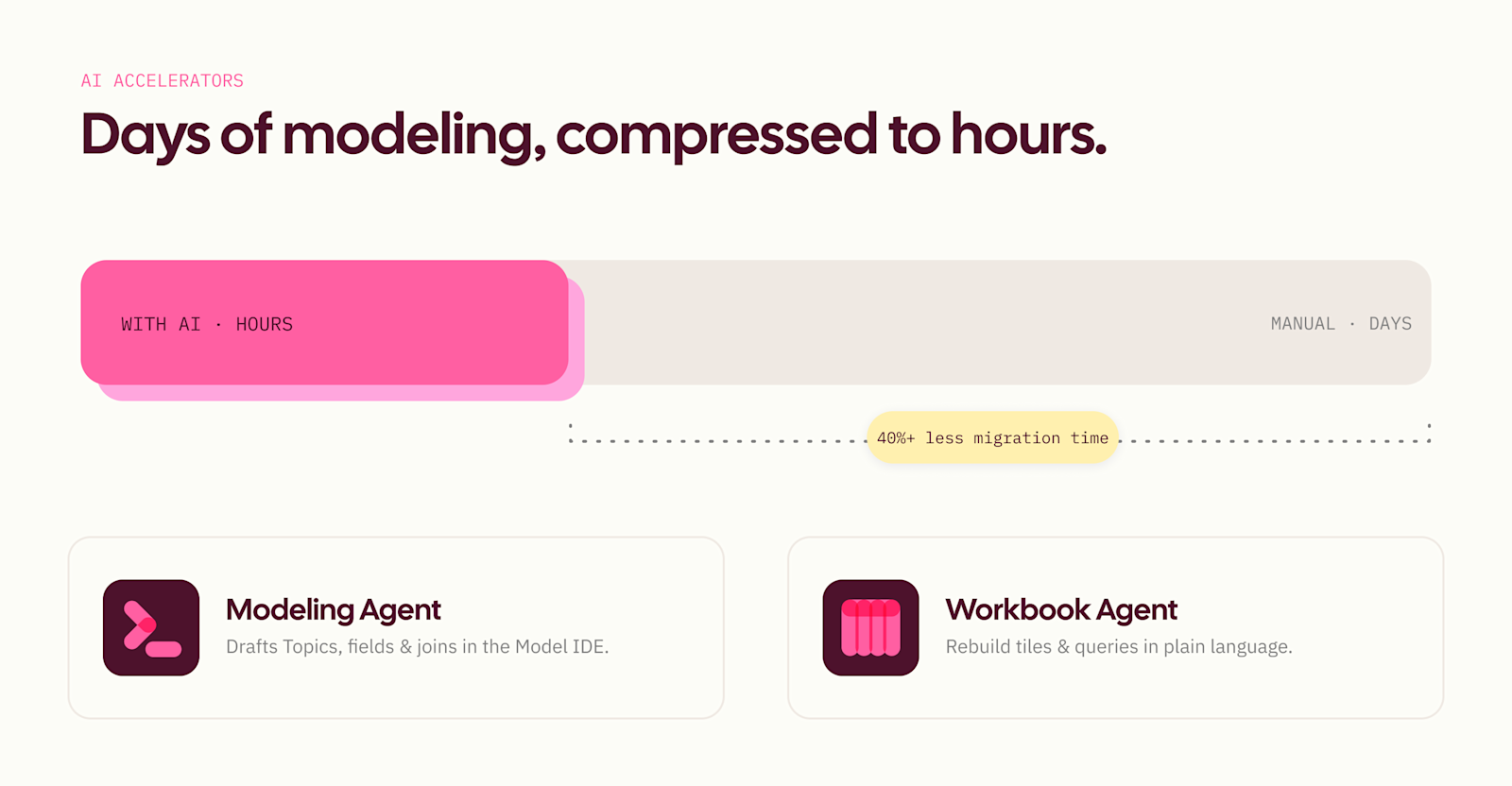
Our Modeling Agent removes the bottleneck of manual model buildout. Feed it your existing structure, and it drafts Topics, fields, and joins directly in the Model IDE. Many teams find it turns what used to take days into hours.
Omni’s Workbook Agent lets you rebuild dashboard tiles and queries in plain language instead of recreating them field by field. Describe what you need, and it generates the query, picks the visualization, and applies filters without manual configuration.
Beyond Omni's native tools, certified partners have built their own accelerators: a LookML converter that speeds up Explore-to-Topic conversion, and migration tooling for Tableau and Power BI workflows if you’re using multiple BI tools. Partners using these tools are seeing 40%+ reductions in migration time. Notable entries include Omnify by Shearwater Data and Omnitrix by EZData, both of which are expert-created tools that dramatically compress migration times.
At Handshake, a single analytics engineer completed a migration that would normally take a data team an entire quarter – in only eight weeks, using Claude Code with agent skills.
Necessity is the mother of invention. I was the only one assigned to this task. The rest of my teammates needed to focus on other projects, so I turned to AI to help me manage this.
Tyler Ritter, Senior Analytics Engineer, Handshake
So how does that math work? You stop migrating by hand. Tyler pointed the agent at Looker Explore and dashboards, and it did the repetitive translation while he stayed on the numbers.
The savings weren't only in terms of headcount. Handshake had scoped this as a three-to-four-month job for six to eight people, including lots of coordination with representatives pulled from every stakeholder team to ensure alignment throughout. Instead, Tyler tackled the entire migration with an agent.
Here’s how he did it:
Translate the model so the same question returns the same answer: Rewrite Looker's LookML as Omni's model, one-to-one, so a query hits the same numbers in either tool.
Close the validation loop: Let the agent run Omni's validator, read the errors, and fix them until the model is clean. That freed him from the slowest part of the loop.
Turn dashboards into a reusable skill: One prompt migrates one dashboard. Once dialed in, a reusable skill migrates hundreds the same way, with almost no cleanup. Omni packaged the same approach as a downloadable agent skill and accompanying scripts.
Check every tile against the source: Have the skill run each migrated tile’s query and compare results to the original to identify the deltas without having to manually check hundreds of tiles.
Teams that invest in semantic context during migration (field descriptions, synonyms, and business definitions added to Topics) end up with a better AI experience on day one than most mature Looker deployments ever had.
Your stakeholders often have analytical questions that are complex, but predictable. These are those multi-step analyses that come up again and again. The semantic layer gives you the building blocks — the fields, joins, and metric definitions. But it doesn't tell the AI how to assemble them for a specific kind of question; that’s where Omni’s AI context comes in.
Sarah Fischbach, Staff Analytics Engineer, Checkr
To see this in action, check out how Checkr turned its existing organizational knowledge into structured context for AI in this case study.
The groundwork you lay now is the foundation for everything AI does later.
The paths to migration #
There's no single right approach. The best path depends on your team's capacity, your current deployment and stack, and how much you want to invest in getting the new environment right from day one. Here's how to think about your options.
Self-serve with migration tooling
Omni offers tooling that handles the most time-consuming parts of the technical migration. Each tool targets a specific phase of the work.
Model translation
Our LookML converter automatically maps Looker Explores to Omni Topics, handling the structural translation that would otherwise require field-by-field manual work. It preserves joins, measures, and field definitions in a format Omni's semantic layer can use immediately.
Asset inventory mapping
Before rebuilding anything, it helps to know what you actually have. The inventory tooling exports a structured view of your existing Looker content (dashboards, tiles, Explores, usage data) so you can prioritize what to migrate and what to cut.
AI-assisted rebuilding
Once the model foundation is in place, Workbook Agent and Modeling Agent handle the tile and dashboard rebuild work in plain language. Teams describe what they need, and the agents generate the queries, visualizations, and field configurations.
The typical self-serve migration completes in under three months. BuzzFeed migrated an eight-year-old Looker estate and launched company-wide in less than three months. Some teams move faster when they come in with a rationalized content set and a clear owner.
While it always helps to come from a clean environment with one owner overseeing the migration end-to-end, we know that's rarely realistic. Our team and partners can help fill the gaps when it isn't.
Managed migration
We understand there are many competing priorities in your world. For resource-constrained teams that can’t staff this internally, we’ll happily assist with some or all of it. Think of it as white-glove: scoping, model translation, content migration, and validation, handled by experts who have done this dozens of times.
The managed path covers everything in the self-serve path and adds dedicated project management, hands-on modeling support, and structured QA at each phase. Your team stays focused on the work that matters, and the migration happens in parallel.
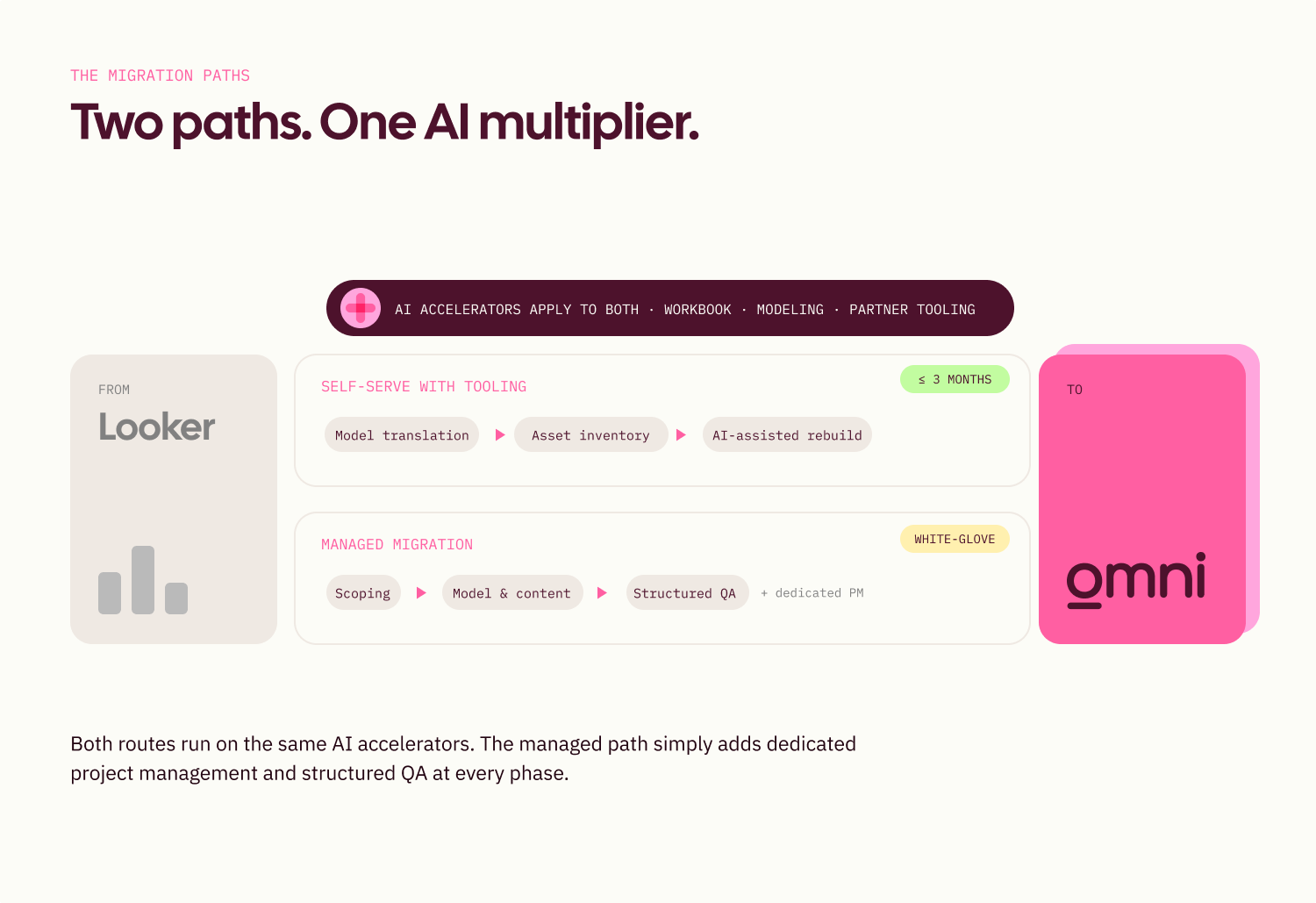
Both paths use AI. Workbook Agent, Dashboard Builder, Modeling Agent, and partner tooling apply regardless of which option you choose. Think of the AI accelerators as a multiplier on top of whichever path you take, not a separate option.
What a good migration produces #
The best migrations set you up with an analytics environment that's meaningfully better than what you had before.
That means semantic definitions aligned with dbt models, simplified permissions, improved naming conventions, and Topics built with enough context that AI works well from day one. It means data teams spend less time on one-off report requests and more time on strategic work. It means business users who can answer follow-up questions themselves, without filing a ticket.
The teams that treat migration as a design opportunity come out with something better than they had before. The investment you put into a thoughtful, strategic migration will pay dividends in every AI answer, every self-serve query, and every dashboard that doesn't need a ticket.
Ready to get started? #
If you're still figuring out whether this is the right move, the best place to start is with the teams that have already done it. Read their stories.
If you're ready to plan your migration, we'd love to help. Talk to our team about what the right path looks like for you.